Tuesday, 16 February 2010

WinRAR 3.80 Free Registration Key

WinRAR is one of the most commonly used program from compressing files into zip or its proprietary rar format. Few months ago there was an offer to get 3.51 legit key. Now the similar offer is being made by PC-WELT magazine but for German Users only and for WinRAR 3.80. Even though it's only for German people, but users across globe could be benefited from this offer by using some valid German proxy.

The offer is valid until 15/3/2010. And you could download your key till 30.09.2010.
Note that it doesn't mean that the key would work till 30/9/2010 but you could download your key by providing your email address till 30/9/2010 as said in Step 9 below. After this date keys will be deleted from their server.


Here are the steps:

1) Either use "Network Settings" from firefox to use a German proxy or use FoxyProxy.
2) The proxy that worked for me was "217.160.129.6" and Port: "3128".
3) Visit http://covermount.win-rar.com/pcwelt0310/
4) If you are using valid German proxy then you will get a page like this


 else you will find a page saying 
"Please note: This offer is not available in your country!"

5) Use your name and any email address. I prefer using 10minutemail instead of using primary email for offers :P
6) Press the button
7) If successful, you will get a page like this.


8)  Visit your email and check for a mail similar to this one. It might be in your spam folder unless you are using temporary mail :)

 
9)You will get a link similar to this one for your key
http://covermount.win-rar.com/pcwelt0310/download.php?email=yourmail@yourhost.com

Open that link and you will be at this page. Click the link to download your Genuine key for WinRAR 3.80.


Save the key to Desktop or some folder.

10) Download your copy of WinRAR 3.80 from 
http://rarlabs.com/rar/wrar380.exe
or use Google to find a copy and install it.

11)Now open the rar file with key. WinRAR will recognize the registration data and install it. If WinRAR doesn't recognize that extract the rarreg.key to WinRAR installation directory.

12) Enjoy your genuine and free WinRAR 3.80.

BTW there is a valid keygen since 3.80 by FFF but that's beyond the scope of this post. You could google for it though ;)


Wednesday, 10 February 2010

Sokoban - The game of brains!

I'm loving this game these days. If you don't know what exactly this game is about, then here is it's formal information.

From Wikipedia, the free encyclopedia
"Sokoban (Warehouse keeper) is a transport puzzle in which the player pushes boxes around a maze, viewed from above, and tries to put them in designated locations. Only one box may be pushed at a time, and boxes cannot be pulled."

Simple enough, huh?

Most linux distributions already contain it, kSoko for KDE and gSokoban for Gnome.

There are plenty of ports for windows and few for mobile. I am going to discuss about them.

Firstly, let's talk about windows versions. Here are some of them which are worth having a look:

1) Sokoban++ : This is very nice implementation of Sokoban. Some of the features:
* The 50 original levels
* Infinite "undo" and "redo"
* Very advanced Skin support
* Reading of many types of levelsets (XSB, RDF, G4B, XML, ...)
* Conversion of levelsets to XSB, G4B, SOK and SLC
* Saving and restoring positions
* Saving and playing solutions
* Mouse support (+drag&drop pushing)
* Hierarchical savegame system
* Multi-user support
* Level solving using various computer Sokoban solving programs (plug-ins)
* Editor mode with undo
* Many languages: English, German, Spanish and more (language packs are on download page)


My only complaint is, this isn't updated from long. The latest version available was released back in 2003!

License : Freeware
Homepage : http://www.joriswit.nl/sokoban/

2)Sokoban YASC - Yet Another Sokoban Clone : This is another nice implementation. Contains solvers, skins support, level generation, and many more. Here is the list of some of it's features :

* Ergonomically perfected basic operations, e.g.,
* .......Drag-and-drop
* .......Unlimited undo/redo
* Superior gameplay features, e.g.,
* ........Reverse mode play - some levels are easier to solve backwards
* ........Deadlock detection - get help avoiding trivial - and not so trivial - blunders
* ........Snapshots - explore different paths, keeping them for later
* ........Multiple views - play different paths simultaneously on the screen
* Large skin collection
* ........Professionally designed skins
* ........Skins carefully optimized for the best gameplay experience
* ........Skins can be imported from most major Sokoban clones
* High-quality tools
* ........Editor - create your own levels
* ........Solver - get help solving small levels
* ........Optimizer - polish your solutions
* ........Generator - generate new small levels automatically
* ........Duplicate finder - compare your level collections, synchronize solutions


This is constantly updated and has tons of features, which makes it one of my favourite Sokoban Clone :)

License : Open Source
Homepage : http://sourceforge.net/projects/sokobanyasc/

3) Sokofan : This clone lacks some of features present in above clones, but it's still pretty decent. The main plus point about it is, it's ability to play non standard sokoban, like hexsokoban. Here are it's features :

- 100x100 maps v2.2
- number of moves supported ~64000 (known ~45000)
- multi-language support (french and spanish)
- supports sokomind+ (numbered sokoban), hexoban, multiban
- autosave best solutions
- push or move optimized pathfinding
- unlimited undo/redo
- eight quicksave slots (all or partial moves)
- replay moves (undo/redo all) at customizable animation speed
- mousewheel undo/redo/replay support
- keyboard or mouse map scrolling
- customizable and resizeable skins
- customizable backgrounds
- customizable sound events
- rotate or/and mirror maps
- rotate or/and mirror moves or solutions v2.3
- resize window to fit map (optionally automatic)
- load (and merge) levels from multiple files
- copy/paste level(s)
- copy/paste moves (normal or run-length encoded)
- copy map (current state)
- copy snapshots of window or map
- recreate map from the moves of a solution
- remember last session (file, level, history, position)
- reverse play starting at end position (pull instead of push)
- locate and browse duplicates or look-alikes v2.1


License : Freeware
Homepage : http://www.freewebs.com/sokofan/index.html

4)YSokoban : It's very small Sokoban implementation. If you just want to try some basic sokoban, then this would be the first choice. It doesn't support solvers. Numerous skins are present for this one, which could be downloaded from it's homepage.
Some of it's features:

# Note: Options dialog is activated from system menu (press alt-space or click with mouse on programs top left corner).
# Skins
# Unlimited undo and redo
# Full mouse support
# Remembers best solution for every level and later replays it on demand, so you do not have to solve it again if you do not want to solve already solved levels.
# Hint: "where can this box go".
# Hint: "which boxes could come over this square" and auto selecting "nearest" one
# Reads Sokoban levels from text file (using xsb format and supporting more than one level in a file).
# Walking through all levels in a selected collection (use ctrl - left/right arrow). You can jump over solved and visit only unsolved levels (use ctrl-shift - left/right arrow).


You can also get a hexoban implementation from it's homepage.

License : Freeware
Homepage : http://ygp.orgfree.com/sokoban.html


Enjoy and start playing now!

Monday, 30 November 2009

Saving images in Firefox

Some of you might be thinking what's difficult in saving images? Just right click on image and you will get menu item to save image. Simple?
Nah...not everytime.

Some sites will not allow to save images, e.g orkut. They just don't display any context menu on right clicking on the image. That's where these tips may come in handy.

1) Drag Drop image to your desktop. This is simplest method. Isn't it?

2) Firefox has a useful option called "Page Info". That could be your friend in many circumstances.

Goto "Tools" -> "Page Info" -> "Media"

In the first list you will find the various images present in the current page. You could select a single image or select multiple images(use Control key), and press the "Save As".


3) Lastly, you could save the images from the cache. Just use "MozillaCacheView" from Nirsoft.

Thursday, 16 July 2009

Windows Search Replacement

If you search a lot using windows inbuilt search program you must have noticed it is slow and if indexing is enabled then it becomes a great space hogger. Recently I tested for some of the search programs both sharewares and freewares. Here are some of them which I liked.

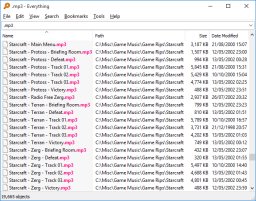
# 'Everything' by voidtools : It's the best I have found for the day to day simple file searching. Although it uses indexing but the index file is only about 1mb for over 100GB indexed files. It can be used only for indexing ntfs partitions. It allows only file searching based on names or type. Doesn't allow to search in network.


And one more thing it's freeware!

Visit Everything's homepage to know more.

# Effective File Search(EFS) from sowsoft : It's another nice search tool which could be used as Windows Search Replacement. It doesn't index files. You could search with different criteria like Filesize, Timestamp etc. It can search in network for files. Another thing it offers is to search for text within files using regex. It's very useful for programmer's point of view.


It's shareware product.

Visit EFS homepage to know more.

# Locate32 : Another search software using indexing. Very fast and plenty of search options.


It's a freeware product.
Visit homepage to know more.

Feel free to recommend your favorite search software.

Cheers!

Wednesday, 15 July 2009

Creating S40 Themes Online

If you don't want to download anything to create themes, then I have found a good site that allows to create themes online for Nokia S40 and Nokia S60 platforms. I have S40 mobile so I only tested for it and I found it really useful.

You can visit it here

There are lots of things that you can customize as compared to similar sites offering online theme creation. Here are are few of them:
# Customize iconset from many preset templates.
# Customize the highlights for grid and list views.
# Customze the wait graphics(progressbar alike).
# Customize sounds.
# Customize individual calendar month backgrounds.

and many more....

Cheers!

Thursday, 9 April 2009

Syntax Highlighter Check

I installed SyntaxHighlighter by Alex Gorbatchev.
Since it uses javascript so to be able to see syntax highlighted code make sure that javascript is enabled for your browser e.g if you have Firefox with noscript, then add this site to whitelist.

Let's test some test code for python

#Sum n numbers
def sum_n(n):
return n*(n+1)/2

print sum_n(10)


and some test code for c


/* Calculates sum of n numbers */

int sum_n(int n)
{
return n*(n+1)/2;
}

int main()
{
int n;
printf("Enter n:");
scanf("%d",&n);
printf("\nSum : %d",sum_n(n));
return 0;
}


Let's see if it works.

Wednesday, 8 April 2009

Project Euler Solutions

I am thinking about posting solutions and strategies about problems from Project Euler. Since there are lots of persons who have solved the starting problems so I think it's fair enough to share my ideas and code as the solutions forums were already closed for some of the problems.

Well if you like to have fun then try to first solve the problem yourself.

Wednesday, 1 April 2009

PSEB 5th class Result out

Today result of 5th class of Punjab School Education Board was made available online. One of my nephew is studying in 5th class so i thought to check it out. But what a pity, after trying a lot i was unable to get the result as I was told that the roll no. couldn't be found. There site is so lame. They need to have some good coders. They expect everybody to read there mind? They gave no hint whatsoever how to enter your roll number. What to include and what not to. After few tries i asked my nephew to give his roll number and he told me the same with area code that is i guess specific to area where he wrote the exams. But the problem again persisted. The roll number was given in format 100-08-123456. I entered it but still no luck. Then after some more tries i thought to remove the hyphens and try it. And guess what it worked!

Now isn't this the responsibility of the staff to tell the students how to enter the roll number. They are not the mind readers. They must be told what to do and how.

Anyways i think there will be many other frustrated souls out there trying to know there future. So i hope this could help you a bit.

And if you don't want to Google then you can find the result at www.ssapunjab.org

Btw my nephew passed with good marks.

Good luck to all!

Friday, 17 October 2008

Nice Sudoku programs

from wikipedia,
"Sudoku is a logic-based number-placement puzzle. The objective is to fill a 9×9 grid so that each column, each row, and each of the nine 3×3 boxes (also called blocks or regions) contains the digits from 1 to 9 only one time each. "

I have tried quite a few sudoku softwares and found some of them very nice with different features. If you are a Sudoku fan and have some other nice alternates which i forgot to put, then comment it. I will add it to the list.

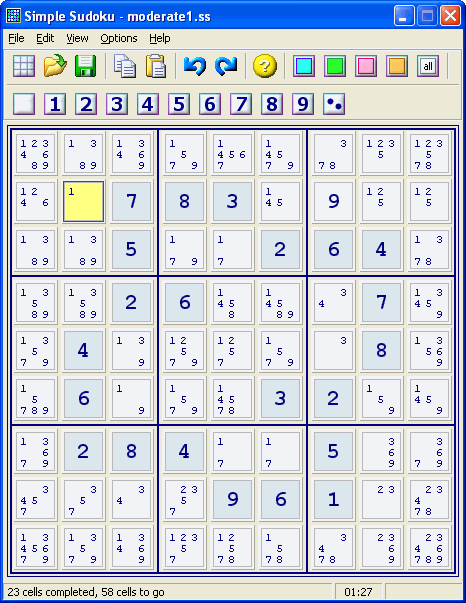
1) Simple Sudoku : According to author, "Simple Sudoku makes high quality puzzles that are symmetrical, have a single solution, and do not require trial & error to solve. The user can also choose between five levels of complexity - from Easy to Extreme. Each puzzle is generated randomly so there is an almost limitless selection."

And he seem to pretty correct. Works with most of the newspaper Sudokus. Also it gives logical hints incase you are stuck at some point on your today's newspaper Sudoku :). Allows only 9x9 puzzles.


License : Freeware

Homepage : http://www.angusj.com/sudoku/


2) Sadman Software Sudoku : This is another nice Sudoku solver/generator. It caches the puzzles in background so that you get puzzles instantly. Along with logical techniques it also
provides Trial & Error for the diabolic Sudokus. It also currently supports 9x9 grids only.

One of the nice feature of this one is that it has got a OCR image reader. Just copy the sudoku image to clipboard and paste it in the program and it might recognize you. If the puzzle can't be read properly from the image then it shows a dialog to fix the values. As the author says it can't be made to work with every image if the fonts are different. Although i have tested a few puzzles from websudoku and it works flawlessly there.


License : Shareware, 30days Trial

Homepage : http://www.sadmansoftware.com/sudoku/

3) Sudocue : Another Sudoku program made in .NET. It has many more features than the above two programs. Supports 9x9 grids. Some of them are:

  • Supports Sudoku variants like Sudoku-X, Windoku and some others
  • Sudoku Scrambler
  • Very thorough help file for learning sudoku.
For complete list visit their homepage

License : Freeware

Homepage : http://www.sudocue.net/


4) Sudoku Explainer : One of my favourite solver for 9x9 grids. It's written in Java and as the name suggests it explains how to solve sudokus. It shows many different techniques which can be applied to solve problems. Along with the excellent solver it also has a Sudoku generator. Custom size grid not supported.


License : Open Source

Homepage : http://diuf.unifr.ch/people/juillera/Sudoku/Sudoku.html


5) JSudoku : This is program that i mostly use nowadays. It's also written in Java and has loads of features including Sudoku variants, custom grid size, online puzzle fetch from some sites.

License : Freeware

HomePage : http://jcbonsai.free.fr/sudoku/?page_id=216


So make your choice now and dive into the world of Sudoku.

Monday, 17 March 2008

Downloading music from music.pz10.com

There is a famous website for all the music lovers called music.pz10.com. If you have visited it earlier than you might be knowing that it only allows the songs to be downloaded by their premium members. According to them, the songs offered to premium members are of higher bitrate and in mp3 format as compared to those that are streamed in wma format of approx. 64kbps. But the quality of streaming songs is decent enough to hear. Go on and try some...

So you have heard couple of songs and might be wishing to have them downloaded to listen them offline. Is there any method? Yes, Indeed there are few methods!

One method is getting the songs from the temporary folder. But you have to wait for every song to finish playing. So this method is too much time consuming :(

Another method would be to have some software that can catch streaming songs like WM Recorder or google for more options.

I will tell you my method. You will need Firefox(Most of you might be already having it), a download manager for accelerated speeds and better management(Orbit or flashget). Here is step by step method:

1) Open music.pz10.com and open the album page which you want to download. I'll download Kuldeep Manak's "Jogi" .

2) Select the songs you want to download and select "Windows Media" radio button. and click the "Play selected songs".


3) A new popup window will open. If it doesn't then make sure that it is added to whitelist of the pop up blocker(or NoScript addon).


4) Right Click the media player bar shown above and select "Properties" and Copy the location of the playlist. You may now close the popup window if you want.


5) Paste this link into the download manager and download the playlist.

6) Now open the playlist file you got in notepad and voila!!! you will get the direct link for all the songs that you have selected in the first step.


7) Paste these links directly into your download manager and you will get all the songs right on your hard disk after your download manager completes downloading ;)

8) Optional:
I coded a little utility that will copy the links in the playlist file. Just open Orbit and make sure that "Clipboard Monitoring" is checked and dragdrop the playlist file to the program window.

Download

Enjoy music!

Monday, 18 February 2008

Maths Programming Challenges

Do you love programming and related problems?
Do you love mathematics?
If yes, then visit ProjectEuler to get some interesting math related puzzles. There is no restriction for language or method you use for solving. So good luck and have fun!

Saturday, 16 February 2008

Wait

Don't be surprised to see only this post in my blog. I promise i will start updating it soon. Until then ...just chill....