Thursday, 9 April 2009

Syntax Highlighter Check

I installed SyntaxHighlighter by Alex Gorbatchev.
Since it uses javascript so to be able to see syntax highlighted code make sure that javascript is enabled for your browser e.g if you have Firefox with noscript, then add this site to whitelist.

Let's test some test code for python

#Sum n numbers
def sum_n(n):
return n*(n+1)/2

print sum_n(10)


and some test code for c


/* Calculates sum of n numbers */

int sum_n(int n)
{
return n*(n+1)/2;
}

int main()
{
int n;
printf("Enter n:");
scanf("%d",&n);
printf("\nSum : %d",sum_n(n));
return 0;
}


Let's see if it works.

Wednesday, 8 April 2009

Project Euler Solutions

I am thinking about posting solutions and strategies about problems from Project Euler. Since there are lots of persons who have solved the starting problems so I think it's fair enough to share my ideas and code as the solutions forums were already closed for some of the problems.

Well if you like to have fun then try to first solve the problem yourself.

Wednesday, 1 April 2009

PSEB 5th class Result out

Today result of 5th class of Punjab School Education Board was made available online. One of my nephew is studying in 5th class so i thought to check it out. But what a pity, after trying a lot i was unable to get the result as I was told that the roll no. couldn't be found. There site is so lame. They need to have some good coders. They expect everybody to read there mind? They gave no hint whatsoever how to enter your roll number. What to include and what not to. After few tries i asked my nephew to give his roll number and he told me the same with area code that is i guess specific to area where he wrote the exams. But the problem again persisted. The roll number was given in format 100-08-123456. I entered it but still no luck. Then after some more tries i thought to remove the hyphens and try it. And guess what it worked!

Now isn't this the responsibility of the staff to tell the students how to enter the roll number. They are not the mind readers. They must be told what to do and how.

Anyways i think there will be many other frustrated souls out there trying to know there future. So i hope this could help you a bit.

And if you don't want to Google then you can find the result at www.ssapunjab.org

Btw my nephew passed with good marks.

Good luck to all!

Friday, 17 October 2008

Nice Sudoku programs

from wikipedia,
"Sudoku is a logic-based number-placement puzzle. The objective is to fill a 9×9 grid so that each column, each row, and each of the nine 3×3 boxes (also called blocks or regions) contains the digits from 1 to 9 only one time each. "

I have tried quite a few sudoku softwares and found some of them very nice with different features. If you are a Sudoku fan and have some other nice alternates which i forgot to put, then comment it. I will add it to the list.

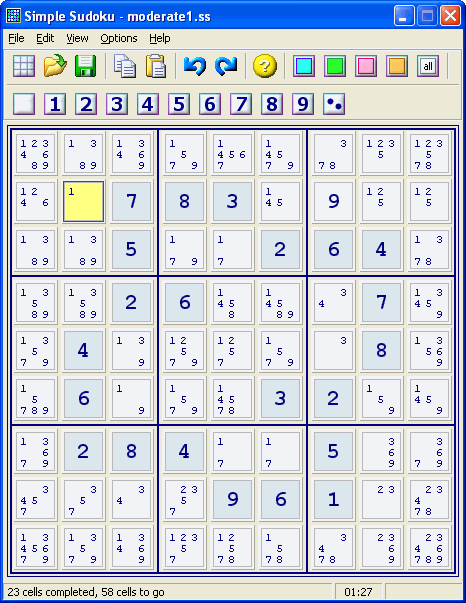
1) Simple Sudoku : According to author, "Simple Sudoku makes high quality puzzles that are symmetrical, have a single solution, and do not require trial & error to solve. The user can also choose between five levels of complexity - from Easy to Extreme. Each puzzle is generated randomly so there is an almost limitless selection."

And he seem to pretty correct. Works with most of the newspaper Sudokus. Also it gives logical hints incase you are stuck at some point on your today's newspaper Sudoku :). Allows only 9x9 puzzles.


License : Freeware

Homepage : http://www.angusj.com/sudoku/


2) Sadman Software Sudoku : This is another nice Sudoku solver/generator. It caches the puzzles in background so that you get puzzles instantly. Along with logical techniques it also
provides Trial & Error for the diabolic Sudokus. It also currently supports 9x9 grids only.

One of the nice feature of this one is that it has got a OCR image reader. Just copy the sudoku image to clipboard and paste it in the program and it might recognize you. If the puzzle can't be read properly from the image then it shows a dialog to fix the values. As the author says it can't be made to work with every image if the fonts are different. Although i have tested a few puzzles from websudoku and it works flawlessly there.


License : Shareware, 30days Trial

Homepage : http://www.sadmansoftware.com/sudoku/

3) Sudocue : Another Sudoku program made in .NET. It has many more features than the above two programs. Supports 9x9 grids. Some of them are:

  • Supports Sudoku variants like Sudoku-X, Windoku and some others
  • Sudoku Scrambler
  • Very thorough help file for learning sudoku.
For complete list visit their homepage

License : Freeware

Homepage : http://www.sudocue.net/


4) Sudoku Explainer : One of my favourite solver for 9x9 grids. It's written in Java and as the name suggests it explains how to solve sudokus. It shows many different techniques which can be applied to solve problems. Along with the excellent solver it also has a Sudoku generator. Custom size grid not supported.


License : Open Source

Homepage : http://diuf.unifr.ch/people/juillera/Sudoku/Sudoku.html


5) JSudoku : This is program that i mostly use nowadays. It's also written in Java and has loads of features including Sudoku variants, custom grid size, online puzzle fetch from some sites.

License : Freeware

HomePage : http://jcbonsai.free.fr/sudoku/?page_id=216


So make your choice now and dive into the world of Sudoku.

Monday, 17 March 2008

Downloading music from music.pz10.com

There is a famous website for all the music lovers called music.pz10.com. If you have visited it earlier than you might be knowing that it only allows the songs to be downloaded by their premium members. According to them, the songs offered to premium members are of higher bitrate and in mp3 format as compared to those that are streamed in wma format of approx. 64kbps. But the quality of streaming songs is decent enough to hear. Go on and try some...

So you have heard couple of songs and might be wishing to have them downloaded to listen them offline. Is there any method? Yes, Indeed there are few methods!

One method is getting the songs from the temporary folder. But you have to wait for every song to finish playing. So this method is too much time consuming :(

Another method would be to have some software that can catch streaming songs like WM Recorder or google for more options.

I will tell you my method. You will need Firefox(Most of you might be already having it), a download manager for accelerated speeds and better management(Orbit or flashget). Here is step by step method:

1) Open music.pz10.com and open the album page which you want to download. I'll download Kuldeep Manak's "Jogi" .

2) Select the songs you want to download and select "Windows Media" radio button. and click the "Play selected songs".


3) A new popup window will open. If it doesn't then make sure that it is added to whitelist of the pop up blocker(or NoScript addon).


4) Right Click the media player bar shown above and select "Properties" and Copy the location of the playlist. You may now close the popup window if you want.


5) Paste this link into the download manager and download the playlist.

6) Now open the playlist file you got in notepad and voila!!! you will get the direct link for all the songs that you have selected in the first step.


7) Paste these links directly into your download manager and you will get all the songs right on your hard disk after your download manager completes downloading ;)

8) Optional:
I coded a little utility that will copy the links in the playlist file. Just open Orbit and make sure that "Clipboard Monitoring" is checked and dragdrop the playlist file to the program window.

Download

Enjoy music!